Help every child understand themselves, build confidence, and take the next step.
◆8 modules◆7–10 minute read◆For students, teachers and families◆v1.0 · April 2026
▌ MISSION BRIEFING
Nlighten Quest is more than an app. It is a guided personal journey.
It helps students understand who they are, what matters to them, what they are working towards, and how to practise the skills that help them grow.
Through onboarding, Coach conversations, personalised Quests, Awards, Superpowers and Hero Challenges, students are supported to build self-awareness, confidence, resilience, communication and purpose — one small step at a time.
This guide explains how each part of the app works, why it matters, and how students can get the most from the experience.
LV.01 · The Student Journey
▷ 8 MODULES
01Stepping in
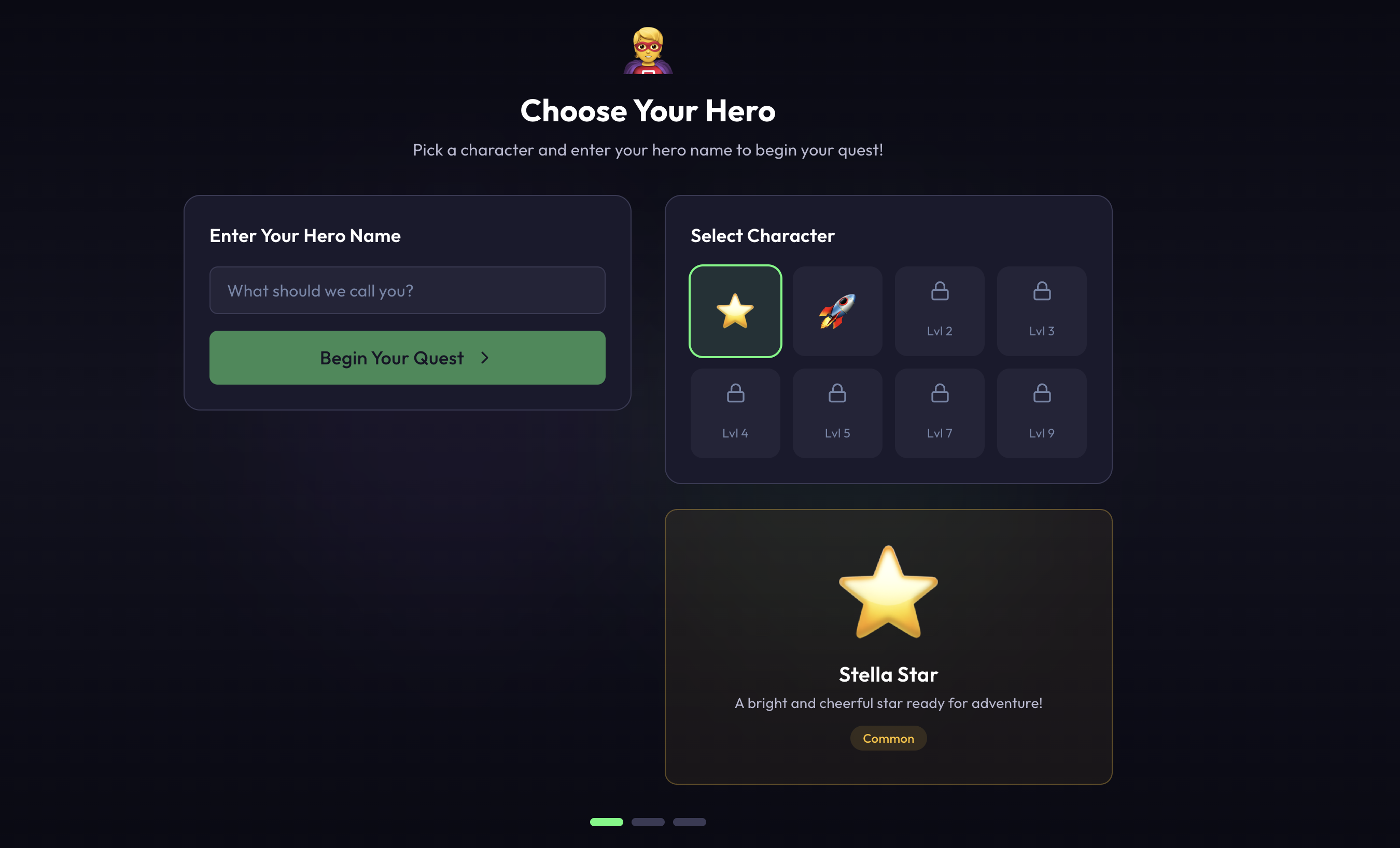
The Start Your Journey screen.
This is where the adventure begins. Simple. Personal. The first moment a student starts to make Quest their own.
What students do
Students begin by entering their name, or the name they would like to be called during onboarding and coaching sessions.
Next, they choose a character symbol to represent them throughout the experience. This symbol becomes part of their identity inside the app.
As students earn more points, they unlock additional symbol options, giving them more ways to personalise their journey over time.
Why it matters
The first step matters because it gives students ownership. Quest is not something being done to them. It is something they are stepping into.
Choosing a name and symbol helps the experience feel personal, safe and familiar from the beginning. It also signals that progress inside Quest is connected to the student's own identity and effort.
How to use it well
Encourage students to choose the name they are most comfortable being called.
Encourage them to choose a symbol that feels like them, not simply the first option they see.
Remind them that more personalisation options will unlock as they engage with the app and earn points.
FRAME 01
Frame 01 · Start Your Journey screen
▌ Field note
The Start Your Journey screen is small, but it sets the tone. When a student feels the app belongs to them, they are more likely to use it honestly and consistently.
02Finding your direction
Onboarding.
This is where Quest starts to understand the student. Not through a form. Through a guided conversation.
What students do
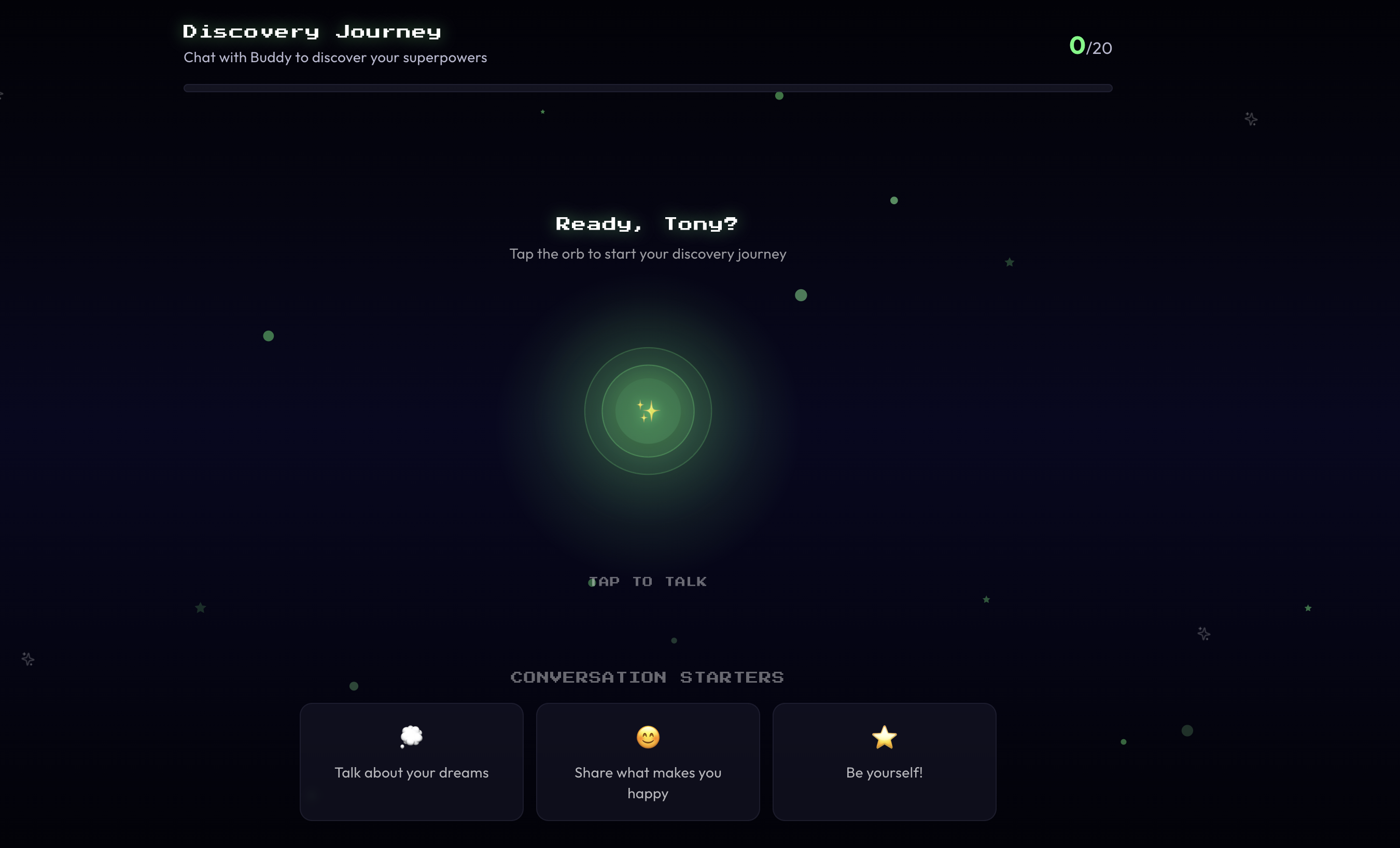
During onboarding, students are guided through a reflective question-and-answer process created for Nlighten Quest.
Rather than simply completing a form, students take part in a guided conversation that helps the system understand who they are, how they think, what matters to them, and what support they may need.
Questions are led by their in-app Coach. The Coach guides the discussion and provides clarification whenever needed.
Students can ask questions at any point if they are unsure or need help understanding what is being asked.
The onboarding process is flexible. Students can complete it in one sitting, or take breaks and return later at their own pace.
Why it matters
Onboarding is the foundation of the Quest experience.
It helps the app begin to understand the student's direction, motivations, strengths, needs and personal development journey. This allows future Quests, challenges and Coach conversations to feel more relevant and personalised.
It also introduces students to a different kind of reflection. They are not being tested. They are being invited to think about themselves, their goals and the kind of person they want to become.
How to use it well
Students should answer in their own words.
They do not need to give perfect answers. Honest answers are more useful than polished ones.
If they are unsure what a question means, they should ask the Coach for help.
If they need a break, they can return later and continue at their own pace.
FRAME 02
Frame 02 · Onboarding conversation
▌ For teachers
Onboarding is not just account setup. It is the start of the student's personal map. The richer and more honest the conversation, the more useful the student's later guidance will become.
▌ Field note
The best onboarding conversations feel calm, curious and unhurried. Students should know they are not being judged. They are being understood.
03Your home base
The Home Page.
A clear view of where the student is, what they are working on, and what comes next.
What students see
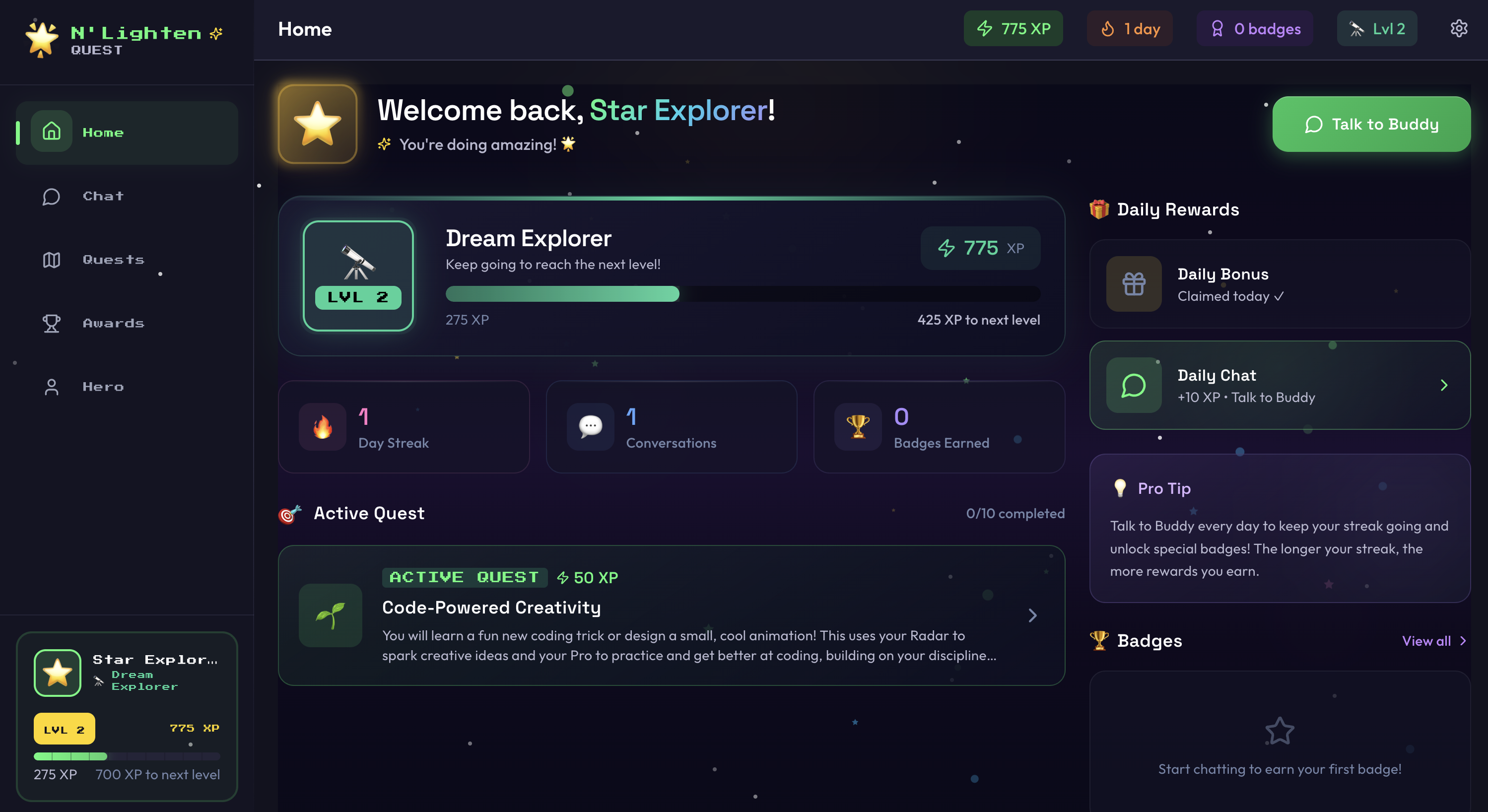
Once onboarding is complete, students are taken to the app's Home Page.
From the Home Page, students can view their current active Quest, track their level, see any awards they have earned, and access an overview of their progress.
This gives them a clear snapshot of where they are in their journey and what to focus on next.
Why it matters
The Home Page gives students a sense of direction.
Instead of feeling lost inside the app, they can quickly see what is active, what has been achieved, and where to go next. It acts as their personal base camp — the place they return to before continuing their Quest.
How to use it well
Start from the Home Page whenever using the app.
Check the active Quest first.
Look at awards and levels to recognise progress.
Use the progress overview to understand what has already been completed and what still needs attention.
FRAME 03
Frame 03 · Home Page overview
▌ For students
Your Home Page is your map. It shows where you are now, what you have already done, and the next step in front of you.
▌ Field note
Progress becomes easier to believe when students can see it. The Home Page turns effort into something visible.
04Your space to talk
Chat.
A calm, supportive space where students can speak openly with their in-app Coach.
What students do
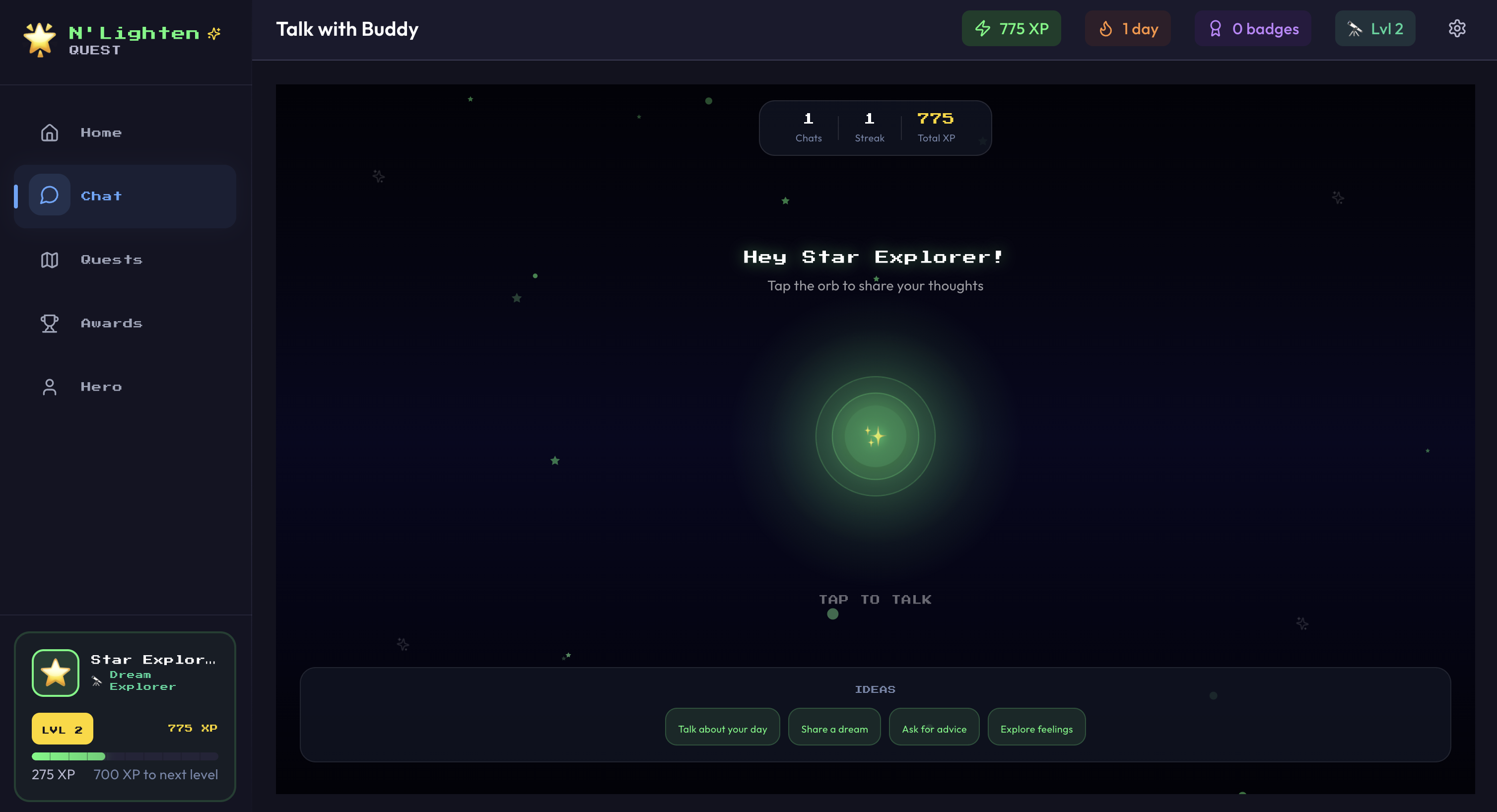
The Chat page is where students can speak with their Coach about anything on their mind.
They may use Chat when they need support, want to reflect, ask questions, or talk through a challenge.
This space is personalised, non-judgemental and action-focused.
Through natural conversation, the Coach helps students understand themselves, express how they feel, and practise small steps toward better behaviour, communication, resilience and purpose.
How the Coach speaks
The Coach speaks in a calm, conversational way — more like a trusted guide than a traditional assistant.
Students can use Chat at any time to explore thoughts, feelings, goals and challenges in a safe and supportive space.
As the Coach learns more about each student, it adapts its responses to provide more relevant support.
This may include helping students build resilience, improve communication, explore goals, and consider future interests or career ideas.
Why it matters
Chat helps students slow down and think.
It gives them a place to name what is happening, reflect on what they are feeling, and consider what they could do next.
This supports self-awareness and personal growth, while also giving teachers meaningful insights to help guide student support.
Use Chat for
Talking through a difficult moment.
Asking for help or clarification.
Reflecting on a Quest or Hero Challenge.
Exploring goals and future interests.
Practising better choices.
Building confidence and communication.
FRAME 04
Frame 04 · Chat with Coach
▌ Safeguarding note
For safeguarding, if a student uses language that suggests possible harm — such as self-harm, harm to others or animals, or inappropriate language — an alert is immediately sent to the teacher dashboard for review.
This helps adults step in when a child may need support.
▌ For students
Chat is a place to be honest. You do not need to have the perfect words. Start with what is true, and the Coach will help you think it through.
▌ For teachers
Chat can surface patterns that may not appear in the classroom. It gives students another way to express what they are carrying, what they are working through, and where support may be needed.
▌ Field note
Use Chat after difficult moments, not only during good ones. The value is often greatest when a student needs to pause, reflect and choose their next step.
05The path forward
Quests.
A student's personal journey towards their North Star, broken into clear, manageable steps.
What Quests are
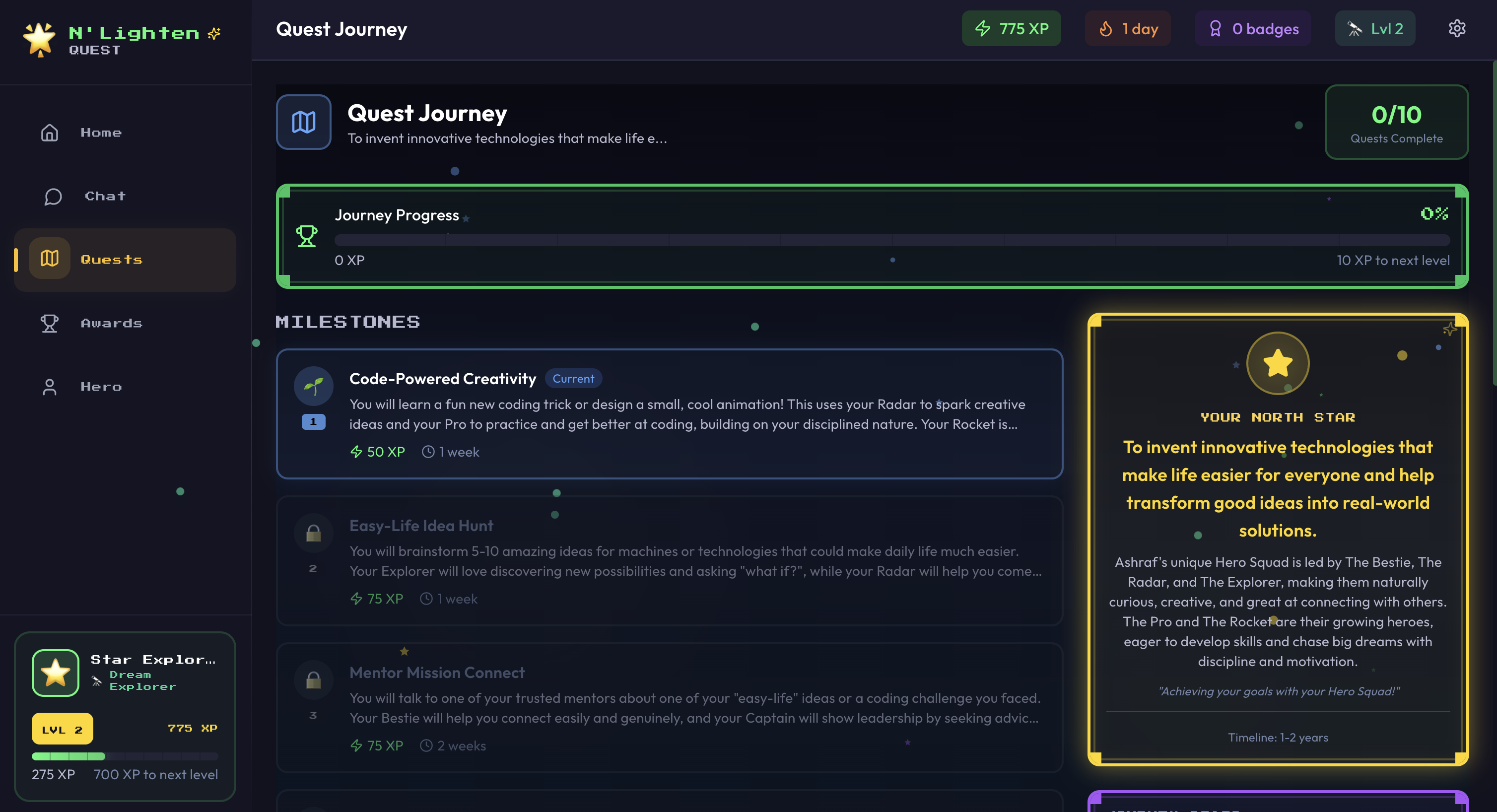
The Quests page shows each student's personal journey toward their main goal, known as their North Star.
The North Star represents the bigger goal or aspiration a student wants to work toward.
The Quests page helps break that journey into clear, manageable steps.
Rather than presenting one large goal, the app turns each student's journey into a series of milestones and smaller tasks, making progress feel achievable and structured.
Students can clearly see where they are in their journey, what they have already completed, and what they need to do next.
How Quests are created
Once a student's profile is built through onboarding, the app generates tailored Quests and challenges based on their personality, strengths, needs and goals.
These Quests are designed specifically for the individual student and are connected to their personal development journey and North Star.
What Quests help build
Each Quest is intentionally designed to help students build meaningful habits, strengths and life skills — not simply complete generic tasks.
Challenges may focus on areas such as kindness, confidence, resilience, communication or skill-building.
For example, a student may be encouraged to complete a social kindness challenge, practise a new skill such as skipping, or pause to take a few deep breaths before reacting in a difficult moment.
How students move forward
Quests are broken into small milestones so students can progress step by step.
To move forward, students complete the task linked to each milestone and then reflect by telling the Coach how they completed it.
Progress is not marked by simply clicking a button. It is reinforced through reflection, conversation and accountability.
The Coach acknowledges each completed task, celebrates the student's progress, and unlocks the next Quest.
This creates a sense of momentum while encouraging students to slow down, reflect on what they are learning, and recognise their progress along the way.
Why it matters
This structure is designed to build accountability, resilience and self-awareness while helping students make meaningful progress toward their North Star.
As students complete challenges, they earn points and unlock the next stage of their journey.
How to use it well
Focus on one milestone at a time.
Complete the real-world task before reflecting.
Tell the Coach what actually happened.
Notice what was learned, not only whether the task was completed.
Use each Quest as practice, not a test.
FRAME 05
Frame 05 · Quests page and milestone view
▌ For students
A Quest is not about being perfect. It is about taking the next step, noticing what happened, and learning from it.
▌ For teachers
Quests turn personal development into visible action. They help students practise behaviour, communication, resilience and confidence through small, repeatable steps.
▌ Field note
The reflection is where the learning lands. A completed task matters, but the conversation afterwards helps the student understand what they did and why it mattered.
06Recognising progress
Awards.
A place to celebrate effort, consistency and meaningful moments of growth.
What students see
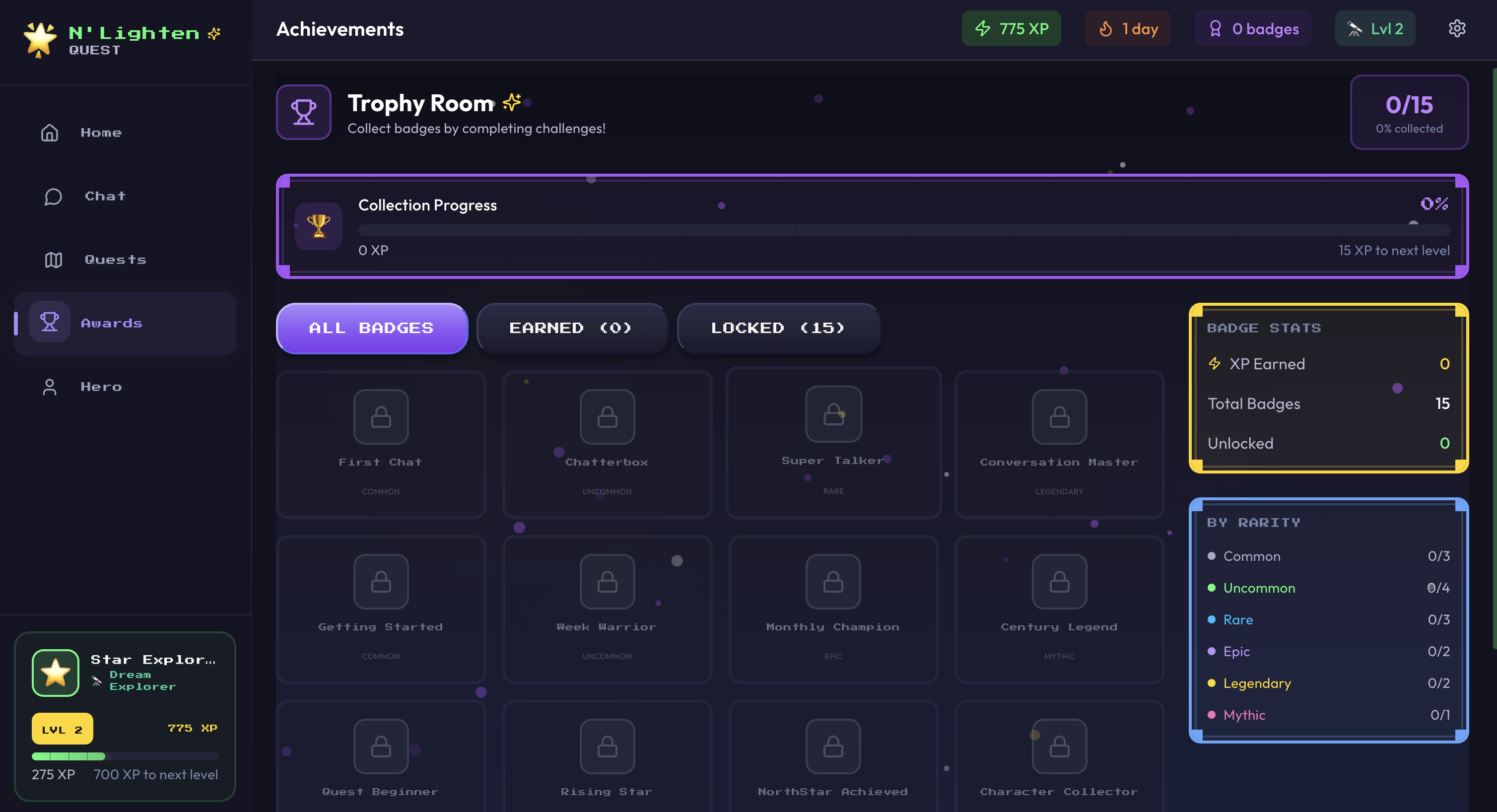
The Awards page is where students can view the badges and achievements they have earned throughout their journey in the app.
As students engage with the app, they collect points, unlock badges, and progress through levels by completing activities, reflecting with their Coach, and taking part in challenges.
Awards recognise progress and celebrate meaningful moments, such as completing a first chat or earning badges like Super Talker.
The Awards page displays both the awards a student has already earned and the full range of badges still available to unlock.
Why it matters
Awards help students see that effort counts.
They show students what they have achieved, while also giving them something to work toward next.
By making progress visible, the Awards page helps motivate students to stay engaged, keep progressing and continue building positive habits.
How to use it well
Check Awards regularly to recognise progress.
Notice what each award represents.
Use locked badges as motivation for future engagement.
Celebrate effort, not only outcomes.
FRAME 06
Frame 06 · Awards page
▌ For students
Awards are signs that you are moving. Every badge shows a moment where you showed up, reflected or took action.
▌ For teachers
Awards are not just rewards. They are indicators of engagement, consistency and the student's willingness to participate in the journey.
▌ Field note
Recognition builds momentum. When students can see their progress, they are more likely to keep going.
07Your Superpower space
Hero.
The place where students begin to understand who they are, recognise their strengths, and explore what makes them unique.
What the Hero page is
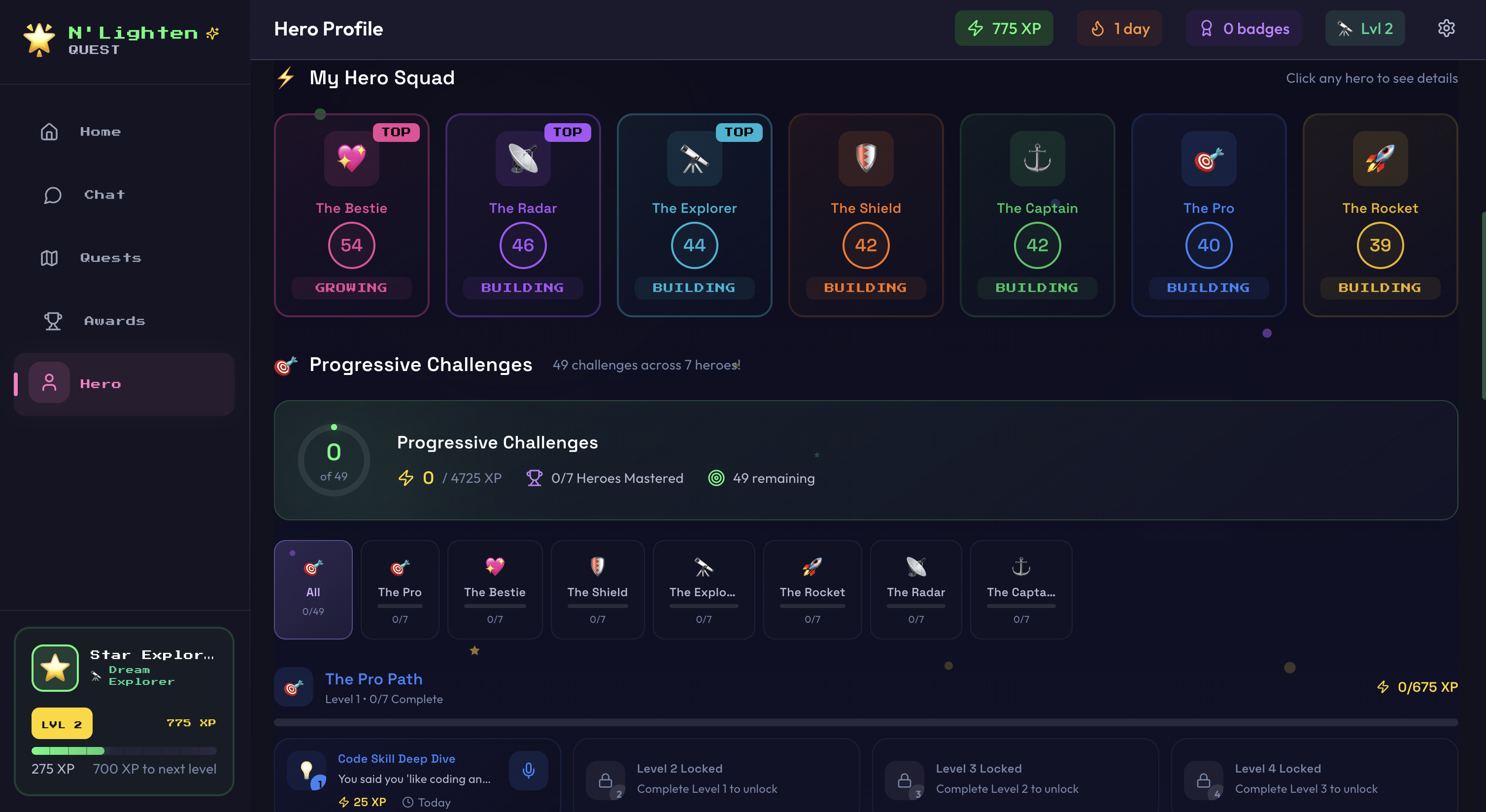
The Hero page is the student's Superpower space.
It is designed to help them understand who they are, recognise their strengths, and explore what makes them unique.
This section introduces students to their Hero Squad: the unique combination of strengths, traits and qualities that shape how they think, respond and grow.
These strengths, known as Superpowers, include qualities such as confidence, creativity, resilience, empathy, focus and teamwork.
Why it matters
The Hero page helps students identify their strengths and understand how they can use them in everyday life.
By recognising where they are naturally strong, students also begin to see where they can grow.
This builds self-awareness early and helps students develop the personal tools they will rely on throughout life.
Understanding Superpowers
Superpowers are the core strengths within a student's personality.
They represent the qualities and life skills students use to navigate challenges, build relationships, and work toward their goals.
When students understand their Superpowers, they begin to recognise both their natural strengths and the areas they can continue developing.
This awareness is valuable because it helps students build confidence, make better choices, and better understand how they respond to the world around them.
Rather than focusing on a single strength, students are encouraged to develop a balanced range of Superpowers.
Just as physical exercise strengthens different parts of the body, Hero Challenges help strengthen different parts of a student's thinking, behaviour and emotional responses.
As students practise these strengths over time, they become more adaptable, self-aware and confident.
They begin to understand not only what their strengths are, but when to use them and how to apply them in different situations.
FRAME 07
Frame 07 · Hero page and Superpowers
Hero Challenges
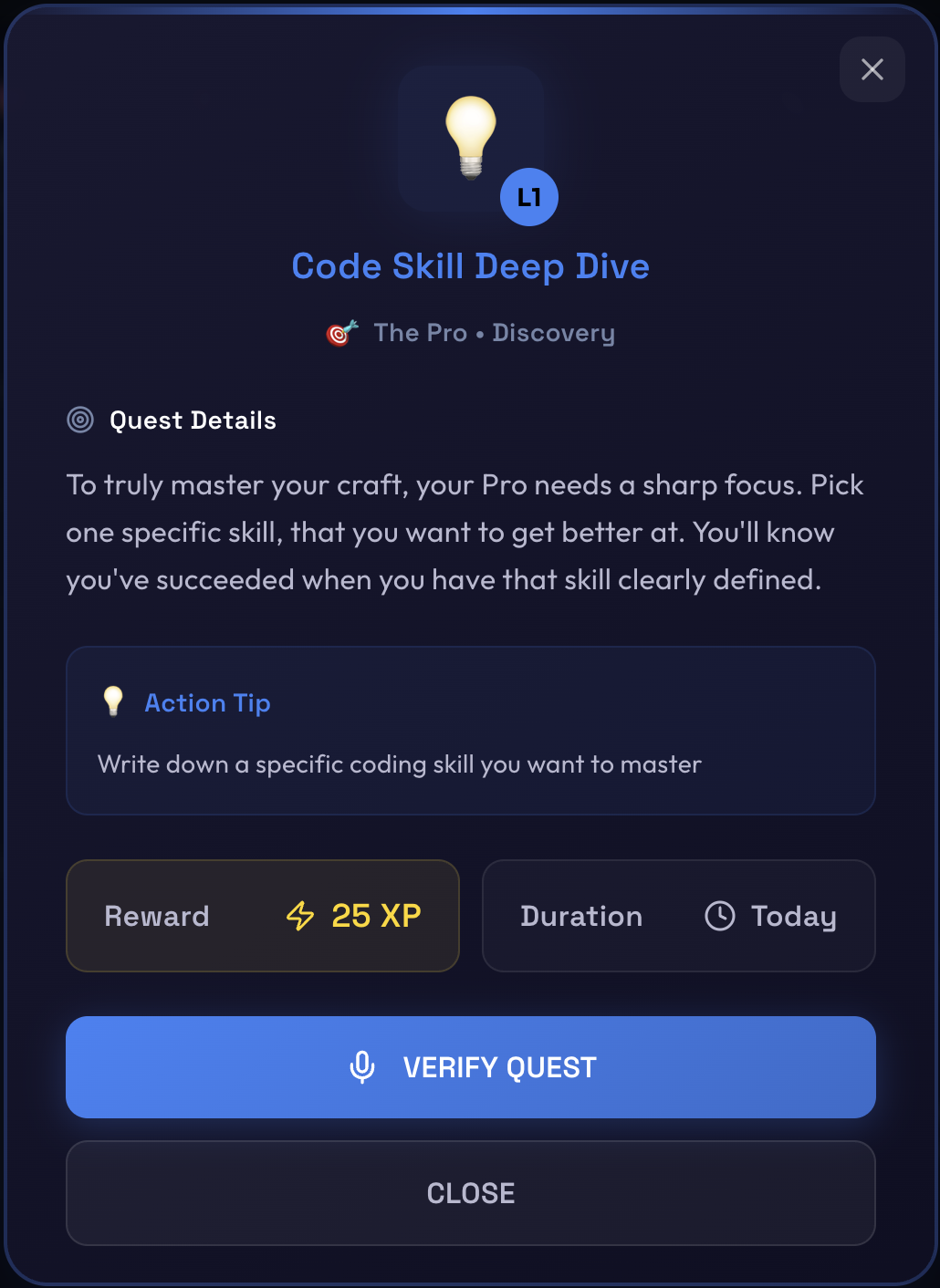
Hero Challenges give students small, practical actions to complete in real life.
These challenges are designed to help students strengthen different parts of their character and behaviour through action, not just encouragement.
Rather than simply being told to "be more confident" or "improve behaviour," students are given small, repeatable actions that help build those skills over time.
This creates structure, momentum and regular opportunities for success.
Each Hero Challenge is deliberately broken into manageable steps so students can build confidence through small wins.
For example, a student may be encouraged to try a simple confidence challenge, practise staying calm before reacting, or complete a small task that strengthens empathy, focus or resilience.
These challenges are designed to help students actively practise their Superpowers in everyday situations.
Over time, repeated action helps those strengths become more natural and easier to access.
Reflection and accountability
Hero Challenges are designed to create accountability through reflection.
Students do not simply press "complete" to finish a challenge.
Instead, they speak with the in-app Coach and explain what they did, how they approached it, and how it went.
This reflection process helps students think more deeply about their actions, reinforces learning, and builds self-awareness.
It also allows the Coach to acknowledge progress, celebrate effort, and reward students with points as they continue to grow.
Why repeated practice matters
A child's brain is constantly developing, and each time they practise a skill, they strengthen the neural pathways that support that behaviour.
The more often students practise a Superpower, the stronger and more natural it becomes.
By repeatedly applying these strengths in real-life situations, students gradually build habits that support emotional regulation, resilience, confidence and personal growth.
Over time, Hero Challenges help students become more capable, self-aware and confident in how they think, act and respond — supporting them as they grow into the best version of themselves.
FRAME 08
Frame 08 · Hero Challenge reflection
How to use it well
Explore the Hero page regularly.
Notice which Superpowers feel natural.
Notice which Superpowers need more practice.
Complete Hero Challenges in real life.
Reflect with the Coach after each challenge.
Try to build a balanced Hero Squad, not only one strength.
▌ For students
Your Superpowers are not about being perfect. They are strengths you can understand, practise and grow.
▌ For teachers
The Hero page gives students a practical language for self-awareness. It helps them move from vague labels like "good" or "bad" to clearer conversations about strengths, choices and growth.
▌ Field note
Children do not grow because they are told to change. They grow when they understand what to practise, get a small action they can actually do, and then reflect on what happened.
08Daily habits
Getting the most from Quest.
Daily habits that make the experience stronger. Quest works best when it becomes part of a student's rhythm, not a one-off activity.
Use it regularly
Small, repeated interactions are more powerful than occasional bursts of activity.
Students should return to the app regularly to check their Quest, speak with the Coach, complete challenges and reflect on progress.
Be honest with the Coach
Quest works best when students explain what they are thinking and feeling in their own words.
They do not need to sound clever. They need to be real.
Reflect properly
The app is not just about completing tasks.
Students should explain what they did, what they noticed, how it felt, and what they learned.
Try the challenges in real life
Hero Challenges and Quest tasks are designed to be practised outside the app — in school, at home and with other people.
The app provides the structure. Real life provides the practice.
Celebrate progress
Awards and levels help students see that growth is happening, even when the steps feel small.
Teachers and parents can support this by noticing effort, not only outcomes.
Use the same language outside the app
Quest becomes more powerful when students, teachers and families use the same language.
Words like North Star, Quest, Coach, Hero Squad, Superpowers, Hero Challenges and reflection help create a shared way of talking about growth.
▌ For students
Open the app. Check your Quest. Talk to your Coach. Try the challenge. Reflect honestly. Keep moving.
▌ For teachers
Quest is most powerful when it becomes part of the wider support conversation. Use the student's progress, reflections and Superpower language to guide practical support in the classroom.
▌ For parents and carers
Ask simple questions that connect to the app:
◇ What Quest are you working on?
◇ What Superpower did you practise today?
◇ What did your Coach help you think about?
◇ What was one small win?
▌ Field note
The goal is not more screen time. The goal is better self-understanding, better reflection and better real-world action.
▷ 09Quick-start checklist
Ready, set, Quest.
A simple checklist for the first session and ongoing use.
▌ STAGE 01
Before using Quest
Make sure the student can access the app.
Give them enough time to complete onboarding calmly.
Explain that Quest is a personal journey, not a test.
▌ STAGE 02
During the first session
Ask the student to enter the name they want to be called.
Ask them to choose a character symbol.
Let them begin onboarding with the Coach.
Remind them they can ask questions if they are unsure.
▌ STAGE 03
After onboarding
Show them the Home Page.
Point out the active Quest.
Show them where Chat, Quests, Awards and Hero can be found.
Explain that progress comes through action and reflection.
▌ STAGE 04
Ongoing use
Encourage regular check-ins.
Use Chat after difficult moments or important reflections.
Complete Quest milestones one step at a time.
Practise Hero Challenges in real life.
Celebrate awards, points and levels as evidence of effort.
▷ 10Language guide
Shared language, shared journey.
The words that make Quest more powerful when everyone uses them.
Quest
The student's personal journey of growth.
North Star
The bigger goal or aspiration the student is working towards.
Coach
The in-app guide that supports reflection, conversation and next steps.
Home Page
The student's base camp for seeing progress and what to focus on next.
Chat
The space where students talk with their Coach.
Quests
Personalised milestones and tasks connected to the student's North Star.
Awards
Badges, points and levels that recognise progress and engagement.
Hero
The student's Superpower space.
Hero Squad
The student's unique combination of strengths, traits and qualities.
Superpowers
The strengths and life skills students can understand, practise and grow.
Hero Challenges
Small real-world actions that help students practise their Superpowers.
Reflection
The process of explaining what happened, what was learned and what could come next.